Migrating multi-site IPsec IKEv2 tunnels from pfSense to MikroTik RouterOS 7
A production case study for moving a four-site policy-based IPsec topology from pfSense to MikroTik with staged cutovers, FQDN peers, validation, and rollback.
Tested on: MikroTik RouterOS 7.x · policy-based IPsec IKEv2 · four-site hub-and-spoke migration
Context
This case study describes a production migration of inter-site VPN connectivity from a pfSense-managed design to MikroTik RouterOS 7 gateways. The environment had four sites, a hub-and-spoke topology, multiple protected subnets at each site, and enough dependencies that a single big-bang cutover was not acceptable.
The difficult part was not creating an IKEv2 peer. It was preserving the complete traffic contract around the tunnel:
- every local/remote subnet pair had to become a matching policy on both ends;
- NAT bypass had to run before generic masquerade rules;
- firewall and FastTrack behavior had to preserve IPsec policy checks;
- return paths had to remain symmetric;
- remote administration had to survive each change;
- the old path had to remain available until application tests passed.
Anonymization note. All site names, router names, domains, public addresses, and internal networks in this article are fictional. Public addresses use the RFC 5737 documentation ranges, and domains use
example.net. Authentication material, provider identities, interface mappings, and hardware identifiers are intentionally excluded.
This is a reconstruction of the architecture and change method, not a verbatim pfSense export or a drop-in RouterOS script.
Sanitized reference topology
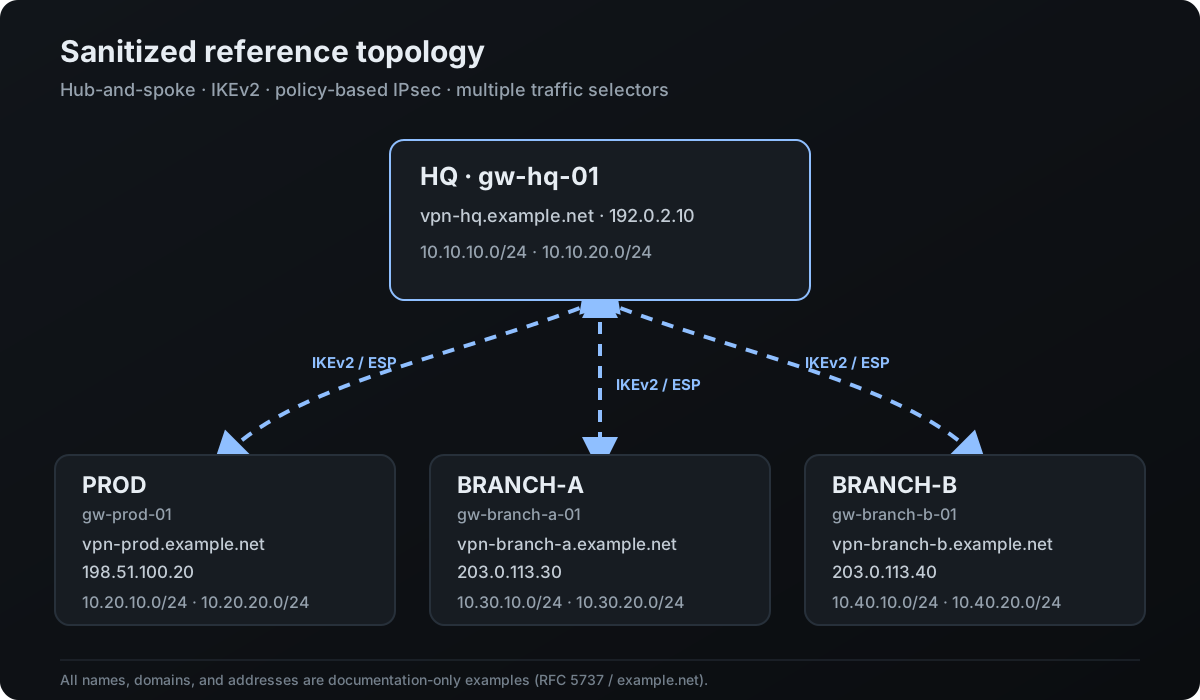
The reference names used throughout the article are:
| Site | Router | Public endpoint | Example protected networks |
|---|---|---|---|
HQ |
gw-hq-01 |
vpn-hq.example.net → 192.0.2.10 |
10.10.10.0/24, 10.10.20.0/24 |
PROD |
gw-prod-01 |
vpn-prod.example.net → 198.51.100.20 |
10.20.10.0/24, 10.20.20.0/24 |
BRANCH-A |
gw-branch-a-01 |
vpn-branch-a.example.net → 203.0.113.30 |
10.30.10.0/24, 10.30.20.0/24 |
BRANCH-B |
gw-branch-b-01 |
vpn-branch-b.example.net → 203.0.113.40 |
10.40.10.0/24, 10.40.20.0/24 |
HQ is the hub. Each spoke has an independent IKEv2 relationship with HQ; the spokes do not have direct tunnels to one another. The design is policy-based, so each permitted subnet pair is represented by a traffic selector rather than routed through a tunnel interface.
Define the evidence boundary first
Old VPN estates are often documented in fragments: a firewall export, a spreadsheet of subnets, DNS records, and operator notes may all disagree. Treating any one artifact as complete is a migration risk.
Before designing the RouterOS side, we built a single selector inventory from several sources:
| Field | Why it matters |
|---|---|
| local and remote protected networks | defines every required Phase 2 selector |
| current peer endpoint and DNS name | determines reachability and cutover method |
| IKE version, authentication method, identities | must match before Phase 1 can establish |
| Phase 1 profile and Phase 2 proposal | defines the compatible cryptographic intersection |
| tunnel initiator/responder behavior | affects recovery after a peer restart |
| NAT bypass rule and position | prevents protected traffic from being translated |
| firewall and FastTrack handling | determines whether packets reach IPsec processing |
| application owner and test | proves business traffic, not only SAs |
| management path | prevents an avoidable remote lockout |
| rollback owner and trigger | makes reversal deterministic |
Unknown values were recorded as unknown. They were not guessed from an adjacent site.
Why an established peer is not enough
In IKEv2 terms, the peer relationship proves only Phase 1. A healthy multi-subnet tunnel also requires the expected child SAs, one or more matching policies, correct routes, permitted forwarding, and successful application traffic.
A misleading but common state is:
active-peersshows an established IKEv2 session;- only one of several selectors has an installed SA;
- ping to one subnet works;
- another service remains unreachable because its selector, NAT exemption, or return route is missing.
For that reason, the expected selector count was derived from the inventory before each cutover. The change was not accepted until the observed policies and traffic tests matched that list.
Migration strategy
The four sites were migrated as separate waves. One spoke was changed, validated, and observed before the next spoke was touched.
The sequence was:
- capture backups, exports, DNS state, routes, policies, SAs, and rule counters;
- build new RouterOS objects disabled and label them consistently;
- verify DNS resolution and WAN reachability to the remote peer;
- enter Safe Mode and activate one site only;
- validate Phase 1, every expected Phase 2 selector, both traffic directions, and application checks;
- leave Safe Mode only after the success criteria were met;
- retain the old path for the agreed observation period;
- proceed to the next site;
- retire the legacy pfSense objects only after all waves were stable.
This limited the failure domain to one relationship and kept the rollback path understandable.
Phase 0: capture a recoverable baseline
Take both a RouterOS backup and a text export. Store them outside the router and protect them as sensitive infrastructure data.
/system backup save name=pre-ipsec-migration
/export show-sensitive=no file=pre-ipsec-migration
Capture the live state separately:
/ip ipsec peer print detail
/ip ipsec identity print detail
/ip ipsec policy print detail
/ip ipsec active-peers print detail
/ip ipsec installed-sa print detail
/ip firewall nat print detail stats
/ip firewall filter print detail stats
/ip route print detail
The export is useful for review and selective recovery. The binary backup is useful for device-level restoration but should not be treated as a portable configuration between unrelated router models or RouterOS versions.
Also verify time synchronization. IKE authentication, certificate validation, and useful incident timelines all depend on correct clocks.
Phase 1: create a disabled RouterOS template
The migration used explicit names and comments so that all objects belonging to one wave could be reviewed together.
The example below shows only the structural shape of an HQ to BRANCH-A relationship:
/ip ipsec peer
add name=peer-branch-a address=vpn-branch-a.example.net \
    exchange-mode=ike2 profile=s2s-profile-v1 disabled=yes \
    comment="MIGRATION-S2S | BRANCH-A"

/ip ipsec policy
add peer=peer-branch-a tunnel=yes \
    src-address=10.10.10.0/24 dst-address=10.30.10.0/24 \
    proposal=s2s-proposal-v1 disabled=yes \
    comment="MIGRATION-S2S | HQ-10 -> BRANCH-A-10"
The identity and authentication commands are deliberately omitted. A real configuration must define the correct local and remote identities and use authentication material from an approved secret or certificate workflow. Never place a production PSK in an article, ticket, shell history, or repository.
Create one policy for every approved selector pair. Do not replace a precise matrix with broad summary networks merely to reduce the rule count. Overlapping selectors can also change which policy wins because IPsec policies are processed in order.
Do not copy cryptographic settings from this or another article. Build s2s-profile-v1 and s2s-proposal-v1 from the organization’s security baseline and the algorithms actually supported by both peers. A one-sided “upgrade” that removes the compatible intersection causes an outage.
Phase 2: move peer addresses to FQDN carefully
RouterOS accepts a DNS name as the peer address, which avoids embedding a provider address in every peer definition:
:put [:resolve domain-name="vpn-branch-a.example.net"]
/ip ipsec peer print detail where name="peer-branch-a"
Using FQDN does not remove the DNS dependency; it makes it explicit. Before cutover, verify:
- the router can resolve the name using its configured DNS path;
- the answer matches the approved endpoint;
- UDP 500 and UDP 4500 are reachable, and native ESP (IP protocol 50) is permitted when NAT-T is not used;
- monitoring and the rollback sheet use the same canonical name;
- a controlled DNS change and IKE re-establishment have been tested in a maintenance window.
After an endpoint change, confirm the actual remote-address in the active peer state. Do not assume a changed DNS record immediately moved an already established session.
Phase 3: handle NAT before enabling policies
Site-to-site traffic must not be caught by a generic Internet masquerade rule. Add a narrow no-NAT rule for each direction represented on that router and place it above generic source NAT.
Example on HQ:
/ip firewall nat
add chain=srcnat action=accept \
    src-address=10.10.10.0/24 dst-address=10.30.10.0/24 \
    disabled=yes comment="MIGRATION-S2S | HQ -> BRANCH-A | NO-NAT"
First inspect the real rule order:
/ip firewall nat print detail statsThen position and enable the rule by its explicit item ID during the change. Avoid publishing or running a blind place-before=0 recipe: the correct position depends on existing destination NAT, source NAT, and policy rules.
NAT counters are evidence. During a test, the no-NAT rule should increment while the Internet masquerade rule should not match that protected flow.
Phase 4: make firewall and FastTrack IPsec-aware
FastTrack can bypass processing needed for IPsec policy checks. The safe design is to accept narrowly scoped encrypted traffic before the FastTrack rule, while retaining the intended site-to-site access restrictions.
Example rule shape:
/ip firewall filter
add chain=forward action=accept ipsec-policy=in,ipsec \
    src-address=10.30.10.0/24 dst-address=10.10.10.0/24 \
    disabled=yes comment="MIGRATION-S2S | BRANCH-A -> HQ"

add chain=forward action=accept ipsec-policy=out,ipsec \
    src-address=10.10.10.0/24 dst-address=10.30.10.0/24 \
    disabled=yes comment="MIGRATION-S2S | HQ -> BRANCH-A"
Inspect the existing filter and FastTrack placement before changing anything:
/ip firewall filter print detail stats
/ip firewall filter print detail stats where action=fasttrack-connection
The example is not a request to permit all traffic between sites. Replace it with the smallest source, destination, protocol, and port scope required by the service inventory. The matching rules must be placed before FastTrack and before any generic drop that would otherwise terminate the flow.
Phase 5: cut over one spoke in Safe Mode
Before activating a wave, confirm an independent management path or an on-site contact. Then enter RouterOS Safe Mode and change only the selected site’s objects.
The operator checklist for one spoke was:
- identify exact peer, identity, policy, NAT, and filter item IDs;
- disable the legacy path for that relationship without deleting it;
- enable the new NAT and filter rules in their reviewed positions;
- enable the complete selector set and the peer/identity;
- initiate traffic from a representative protected host;
- validate the control plane, data plane, and business services;
- leave Safe Mode only when all checks pass.
Using explicit item IDs matters. A broad [find comment~"MIGRATION"] command is convenient in a lab but can affect several future waves on a production router.
Validation matrix
Use three layers of evidence.
1. Control plane
/ip ipsec active-peers print detail
/ip ipsec installed-sa print detail
/ip ipsec policy print detail where comment~"BRANCH-A"
/log print where topics~"ipsec"
Confirm that:
- the active peer uses the expected local and remote endpoint;
- the IKEv2 state is established without repeated negotiation failures;
- the observed child SAs match the selector inventory;
- active policies report the expected Phase 2 state;
- byte and packet counters increase during tests.
2. Data plane
Test each selector pair in both directions from representative hosts. A router-originated ping can provide an additional check when its source address is part of the policy:
/ping 10.30.10.10 src-address=10.10.10.1 count=5Also inspect NAT and filter counters:
/ip firewall nat print stats where comment~"BRANCH-A"
/ip firewall filter print stats where comment~"BRANCH-A"
Ping is not a complete acceptance test. It may be blocked while the actual application works, or it may work while DNS, TCP, database, SMB, VoIP, or another required service fails.
3. Business services
For each selector, record at least one owner-approved test such as:
| Test | Expected evidence |
|---|---|
| DNS lookup through the intended resolver | correct answer and acceptable latency |
| application TCP connection | successful handshake and authentication |
| file or API transaction | read/write or request/response succeeds |
| reverse-initiated connection | service can start a session in the opposite direction |
| monitoring probe | returns to healthy without suppressing a real failure |
The change is successful only when all mandatory tests pass. “Peer established” is a diagnostic observation, not an acceptance criterion.
Multi-WAN and return-path checks
If a site uses several uplinks, IPsec must be evaluated together with source selection, policy routing, NAT, and firewall input rules. A peer may negotiate through one WAN while reply traffic leaves through another, or a custom routing table may capture protected traffic before the IPsec policy can match.
The companion article MikroTik RouterOS 7: multi-WAN policy routing with per-VLAN failover covers the routing side in more detail.
For this migration, each wave included:
- the expected WAN source address for IKE and ESP/NAT-T;
- a route to the remote public endpoint;
- internal-destination exceptions before generic Internet policy routing;
- a symmetric return path for every protected subnet;
- a failover test only after the normal path was stable.
Do not introduce WAN failover and IPsec migration in the same untested step. Stabilize one control plane before adding another.
Rollback plan
Rollback was designed before the first cutover and executed per site, not globally.
Rollback triggers included:
- the peer could not establish within the agreed window;
- expected child SAs were missing;
- management reachability became unstable;
- any mandatory business test failed;
- packet loss, asymmetric routing, or repeated rekey failures appeared;
- the change window no longer allowed proper diagnosis.
The recovery sequence was:
- stop expanding the change to other selectors or sites;
- capture logs, active peers, installed SAs, policy state, and rule counters;
- disable the new site’s policies and peer using the reviewed item IDs;
- restore the old routing/firewall path or re-enable the retained pfSense relationship;
- generate fresh traffic and verify the legacy path with the same acceptance tests;
- document the failure before attempting another change.
Do not delete the old configuration during the cutover. Deletion turns a controlled reversal into a rebuild under outage pressure.
Monitoring after migration
At the time of the migration, all servers and pfSense gateways were still monitored in Zabbix over TLS PSK-protected connections. Zabbix was therefore part of the operational evidence during the cutover; the later Prometheus-based design should not be retroactively presented as the monitoring stack used during the migration.
The current responsibility split is narrower and deliberate:
| Scope retained in Zabbix | Monitoring role |
|---|---|
| computers | Zabbix Agent with TLS PSK |
| printers | device state and consumable levels, including cartridges |
| Yealink IP phones | availability of the device web interface |
No PSK identities or key values belong in diagrams, articles, exports, or troubleshooting logs.
The observation period should cover more than a single successful ping. Watch at least:
- IKE and child-SA rekeys;
- peer uptime and unexpected renegotiation;
- policy byte counters for every active selector;
- router CPU, memory, WAN state, and packet loss;
- independent application probes across the tunnel;
- logs for identity, proposal, replay, timeout, and fragmentation errors.
For the newer network-monitoring layer, the SNMP exporter network monitoring guide is useful for router and interface health. Pair it with service-level probes across the protected networks. Device health and an established IKE session do not prove that every application path works.
If large packets fail while small pings succeed, inspect MTU, PMTUD, MSS handling, and intermediate filtering before changing cryptographic parameters.
Stop conditions
Stop the rollout if:
- the selector inventory cannot be reconciled with the live configuration;
- the remote peer’s identity or authentication material is uncertain;
- DNS resolution differs between the router and the approved change record;
- NAT bypass cannot be placed without affecting unrelated production rules;
- FastTrack or policy routing behavior is not understood;
- there is no independent management path or responsible on-site contact;
- the old path cannot be restored inside the change window;
- a previous wave has not completed its observation period.
Uncertainty is a reason to pause, not a reason to broaden rules until traffic starts flowing.
Lessons from the migration
The main outcome was operational rather than vendor-specific:
- model the VPN as a list of traffic contracts, not as one peer object;
- migrate one relationship at a time and keep the failure domain small;
- make comments and object names carry the intended site and selector;
- use FQDN peers, but treat DNS as a production dependency;
- validate Phase 1, every Phase 2 selector, both directions, and real services separately;
- use counters and packet paths as evidence instead of relying on a green status icon;
- design and rehearse rollback before removing the old firewall.
The configuration becomes maintainable when a future operator can answer three questions quickly: which networks should communicate, which rules implement that intent, and how to prove the path is working.
References
- MikroTik RouterOS IPsec: https://help.mikrotik.com/docs/spaces/ROS/pages/11993097/IPsec
- MikroTik RouterOS packet flow: https://help.mikrotik.com/docs/spaces/ROS/pages/328227/Packet%2BFlow%2Bin%2BRouterOS
- MikroTik RouterOS firewall filter: https://help.mikrotik.com/docs/spaces/ROS/pages/48660574/Filter
- MikroTik RouterOS mangle and MSS handling: https://help.mikrotik.com/docs/spaces/ROS/pages/48660587/Mangle